Getting Started with AWS Bedrock: A Beginner's Guide to Generative AI
Learn how to build AI-powered applications using Amazon Bedrock, foundation models, and the AWS SDK
Full Article
Read the complete article, including examples, background, practical insights, and technical details.
Generative AI is changing how developers build applications.
From intelligent chatbots to automated document processing, businesses are increasingly integrating large language models (LLMs) into their software.
However, deploying and managing AI models independently can be complicated. Developers must consider infrastructure, scalability, security, and model hosting.
This is where Amazon Bedrock comes into the picture.
Amazon Bedrock is a fully managed AWS service that allows developers to access powerful foundation models through APIs without managing the underlying infrastructure.
In this guide, we'll explore how Bedrock works and build a simple AI-powered application using Node.js.
1. What Is Amazon Bedrock?
Amazon Bedrock is a managed generative AI platform offered by Amazon Web Services (AWS).
It provides access to foundation models developed by Amazon and other AI companies through a unified service.
These models can perform tasks such as:
- Text generation and summarization
- Conversational AI
- Code generation
- Document analysis
- Image generation
- Information extraction
Instead of deploying large AI models on expensive GPU servers, developers can invoke supported models through AWS APIs.
The biggest advantage is simplicity.
You focus on building your application while AWS handles the infrastructure required to run the models.
2. Understanding Foundation Models
Foundation models are large AI models trained on extensive datasets.
They can perform many different tasks without requiring developers to train separate models for every use case.
Amazon Bedrock supports models from multiple providers, with availability depending on the AWS Region.
Examples include:
| Provider | Model family |
|---|---|
| Amazon | Nova |
| Anthropic | Claude |
| Meta | Llama |
| Mistral AI | Mistral |
| Cohere | Command and Embed |
Different models have different strengths.
For example, some models are optimized for complex reasoning, while others prioritize speed, lower cost, or multimodal processing.
Developers can select models based on their application's requirements.
This flexibility is one of Bedrock's strongest features.
3. Why Should Developers Use AWS Bedrock?
There are several reasons developers might choose Bedrock over hosting their own models.
No Infrastructure Management
Running large language models independently often requires specialized GPUs, container orchestration, and monitoring.
Bedrock removes much of this operational complexity. If you want to understand the GPU programming involved in building that kind of infrastructure, see How to Start CUDA Development: A Step-by-Step Guide for Beginners.
Multiple Model Choices
Developers can experiment with different supported models without building entirely separate hosting infrastructure.
AWS Integration
Bedrock integrates with services such as:
- AWS Lambda
- Amazon S3
- Amazon CloudWatch
- AWS IAM
- AWS Step Functions
This makes it particularly useful for applications already running within the AWS ecosystem.
Enterprise Security
Bedrock supports IAM-based permissions, encryption, and other AWS security controls.
AWS also states that customer inputs and model outputs are not used to train its underlying foundation models.
4. Setting Up Amazon Bedrock
Before making your first AI request, you'll need an AWS account.
Step 1: Open the AWS Console
Visit AWS Management Console.
Search for Amazon Bedrock and open the service.
Step 2: Choose an AWS Region
Bedrock models are not necessarily available in every AWS Region.
Choose a Region that supports your preferred model.
For example, us-east-1 is commonly used for Bedrock experimentation.
Step 3: Select a Model
Open the Bedrock model catalog and explore the available foundation models.
Depending on the provider and model, you may need to complete additional access requirements before invoking it.
Step 4: Configure IAM Permissions
Your application needs permission to invoke Bedrock models.
For basic inference, the relevant IAM action is:
{
  "Effect": "Allow",
  "Action": ["bedrock:InvokeModel"],
  "Resource": "arn:aws:bedrock:us-east-1::foundation-model/*"
}
This is an illustrative policy statement, not a complete IAM policy.
For production applications, restrict access to the specific models your application requires rather than using a wildcard.
5. Building Your First Bedrock Application with Node.js
Let's create a simple application that sends a prompt to a foundation model and displays the response.
We'll use the AWS SDK for JavaScript.
Step 1: Initialize the Project
Create a new Node.js project.
mkdir bedrock-demo
cd bedrock-demo
npm init -y
Install the Bedrock Runtime SDK:
npm install @aws-sdk/client-bedrock-runtimeStep 2: Configure AWS Credentials
For local development, configure credentials using the AWS CLI:
aws configureAlternatively, use an AWS profile or IAM Identity Center authentication.
Avoid hardcoding access keys inside your application.
Step 3: Create the Application
Create a file named index.mjs.
import {
  BedrockRuntimeClient,
  ConverseCommand,
} from "@aws-sdk/client-bedrock-runtime";

const client = new BedrockRuntimeClient({
  region: "us-east-1",
});

const command = new ConverseCommand({
  modelId: "amazon.nova-lite-v1:0",
  messages: [
    {
      role: "user",
      content: [
        {
          text: "Explain generative AI in simple terms.",
        },
      ],
    },
  ],
  inferenceConfig: {
    maxTokens: 300,
    temperature: 0.7,
  },
});

try {
  const response = await client.send(command);

  const answer = response.output.message.content
    .filter((item) => item.text)
    .map((item) => item.text)
    .join("\n");

  console.log(answer);
} catch (error) {
  console.error("Bedrock request failed:", error);
}
The example uses Amazon Nova Lite and Bedrock's Converse API.
Ensure the model is available and enabled for invocation in your selected Region.
Step 4: Run the Application
Execute:
node index.mjsIf your credentials, model access, and permissions are configured correctly, the application will generate an explanation of generative AI.
Congratulations! You've successfully made your first request to Amazon Bedrock.
6. Understanding the Bedrock Converse API
The Converse API provides a consistent interface for interacting with supported conversational foundation models.
Instead of learning completely different request formats for every model provider, developers can use a common message structure.
Important parameters include:
- modelId: Identifies the foundation model.
- messages: Contains the conversation history.
- maxTokens: Limits the number of generated output tokens.
- temperature: Influences the randomness of generated responses.
For applications requiring streamed responses, Bedrock also provides the ConverseStream API.
This is useful when building chat interfaces where users expect text to appear progressively.
7. Exploring Advanced Bedrock Features
Bedrock offers more than basic text generation.
Knowledge Bases
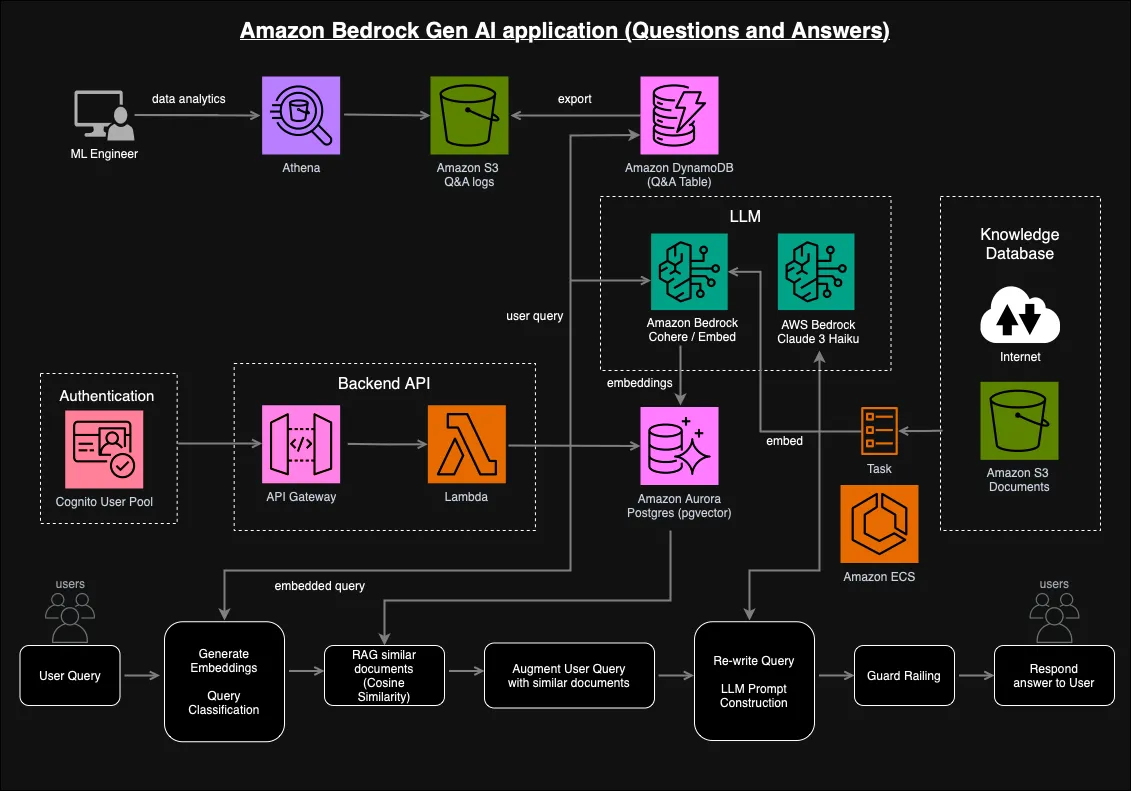
Knowledge Bases for Amazon Bedrock help developers build retrieval-augmented generation (RAG) applications.
These applications retrieve relevant information from external data sources before generating answers. For a hands-on look at the vector search often used in these systems, read Vector Databases from Scratch: A Hands-On Guide for AI Engineers.
For example, a company could build an internal chatbot that answers questions using its technical documentation.
Agents
Amazon Bedrock Agents can orchestrate multi-step workflows and interact with configured tools and knowledge sources.
For example, an agent could help users check order details or initiate an approved business workflow.
Guardrails
Amazon Bedrock Guardrails provide configurable safeguards for generative AI applications.
They can help filter harmful content, restrict certain topics, and detect sensitive information.
However, guardrails should complement application-level validation rather than replace it.
8. Understanding Amazon Bedrock Pricing
Amazon Bedrock pricing depends on the model and inference configuration.
For many models, on-demand inference charges are based on input and output tokens.
Other pricing arrangements may apply to provisioned capacity, batch processing, or additional features.
Consider these factors when estimating costs:
- Number of requests
- Average input tokens
- Average output tokens
- Selected foundation model
- Additional services such as Knowledge Bases
For example, a chatbot processing thousands of conversations daily may generate substantial token usage.
Developers should monitor usage through AWS billing tools and configure AWS Budgets alerts.
Always review the official Amazon Bedrock pricing page before deploying a production application.
9. Practical Use Cases for Developers
Amazon Bedrock can support a wide range of applications.
AI Customer Support: Build conversational assistants that answer common customer questions.
Document Summarization: Extract important information from reports, contracts, and technical documentation.
Developer Assistants: Generate code explanations, documentation, and troubleshooting suggestions.
Enterprise Search: Combine Knowledge Bases with foundation models to answer questions using internal company information.
Content Automation: Generate product descriptions, marketing drafts, and structured summaries.
The most valuable applications typically combine foundation models with reliable business data and carefully designed workflows.
10. Best Practices Before Going to Production
Before deploying a Bedrock-powered application, consider several important practices. For a broader blueprint on structuring and shipping a maintainable application as a solo developer, see The Complete Guide to App Architecture for Solo Developers.
- Apply least-privilege IAM permissions. Give applications access only to the required models and resources.
- Monitor token consumption. Unexpected usage can increase operating costs.
- Implement retries and error handling. Model requests can fail or encounter throttling.
- Protect sensitive information. Avoid unnecessarily sending confidential data in prompts.
- Evaluate model responses. Foundation models can produce inaccurate or misleading information.
- Use backend APIs. Keep model invocation and AWS permissions on the server rather than exposing credentials in frontend applications.
Final Thoughts
Amazon Bedrock makes generative AI development more accessible to developers already working within the AWS ecosystem.
Instead of spending time deploying and maintaining large language models, teams can focus on building useful AI-powered features.
Its support for multiple foundation models, AWS integrations, Knowledge Bases, and Agents makes it suitable for both experimentation and enterprise applications.
However, choosing the right model, controlling costs, and evaluating response quality remain essential.
The best way to learn Amazon Bedrock is to start small: build a simple chatbot, experiment with different models, and gradually introduce more advanced capabilities.
TL;DR
- Amazon Bedrock is a fully managed AWS generative AI service.
- It provides API access to foundation models from multiple providers.
- Developers can integrate Bedrock using the AWS SDK for JavaScript.
- The Converse API simplifies conversational model interactions.
- Knowledge Bases enable RAG-based applications.
- Agents help orchestrate AI-powered workflows.
- Pricing depends on model selection, token usage, and configuration.
- IAM permissions, monitoring, and response evaluation are essential for production applications.
Amazon Bedrock provides a practical starting point for developers who want to build generative AI applications without managing model infrastructure.
References
Comments load as you scroll…